Financial Reconciliation for Events With Less Manual Work

A packed event can end before its finances are settled. Financial reconciliation for events brings transaction records from different payment channels together and compares them with bank, card and supplier records. The goal is to identify errors, missing entries and duplicates before the figures feed into post-event reporting.
High transaction volumes make reconciliation harder when records sit across disconnected systems. It is not just a matter of adding up takings: the final picture depends on matching transactions, resolving discrepancies and confirming that balances agree.
This article explains what financial reconciliation means, how it applies to event finances and why manual processing becomes difficult at scale. It also covers how post-event checks support accurate reporting, from bringing records together to reviewing adjustments and outstanding differences.
Key Takeaways
• Understand how reconciliation compares internal records with bank, card and supplier documents to surface discrepancies.
• Identify where manual processing creates friction, from duplicate entries to small data-entry errors.
• Learn how accounting software can match routine transactions and help focus attention on exceptions that need review.
• See which records and checks contribute to a clearer post-event financial report, including card receipts and petty cash.
• Recognise how coordinated show and technical production can support the wider financial planning of a complex event.
What Is Financial Reconciliation?
Financial reconciliation compares two sets of records to check that transactions are complete and accurate. For an event, it connects ticketing, payment, bank and supplier records with the figures used in post-event reporting.
Meaning and importance of financial reconciliation
Reconciliation checks whether an internal ledger agrees with an external record, such as a bank statement or supplier statement. Comparing the two can reveal accounting errors, omitted transactions and duplicate entries before figures are used in financial statements.
For an event team, this matters when a payment appears in the ticketing platform but not in the bank account, or when a supplier invoice differs from the amount recorded as payable. Recording each difference and its explanation gives reviewers a clearer basis for assessing the final balances.
Account reconciliation types and methods
Different reconciliation methods compare different records. Bank reconciliation checks internal cash records against a bank statement, while supplier reconciliation compares the accounts payable ledger with supplier statements. Intercompany reconciliation reviews transactions between units or subsidiaries of the same parent company.
The right method depends on the account and the evidence available. A reviewer can match entries individually, compare totals or investigate selected transactions against supporting documents. For example, comparing a deposit form with a ledger entry helps establish whether a recorded receipt is legitimate and accurate. Choosing the right approach makes differences easier to locate and explain.
Reconciling event sales and account balances
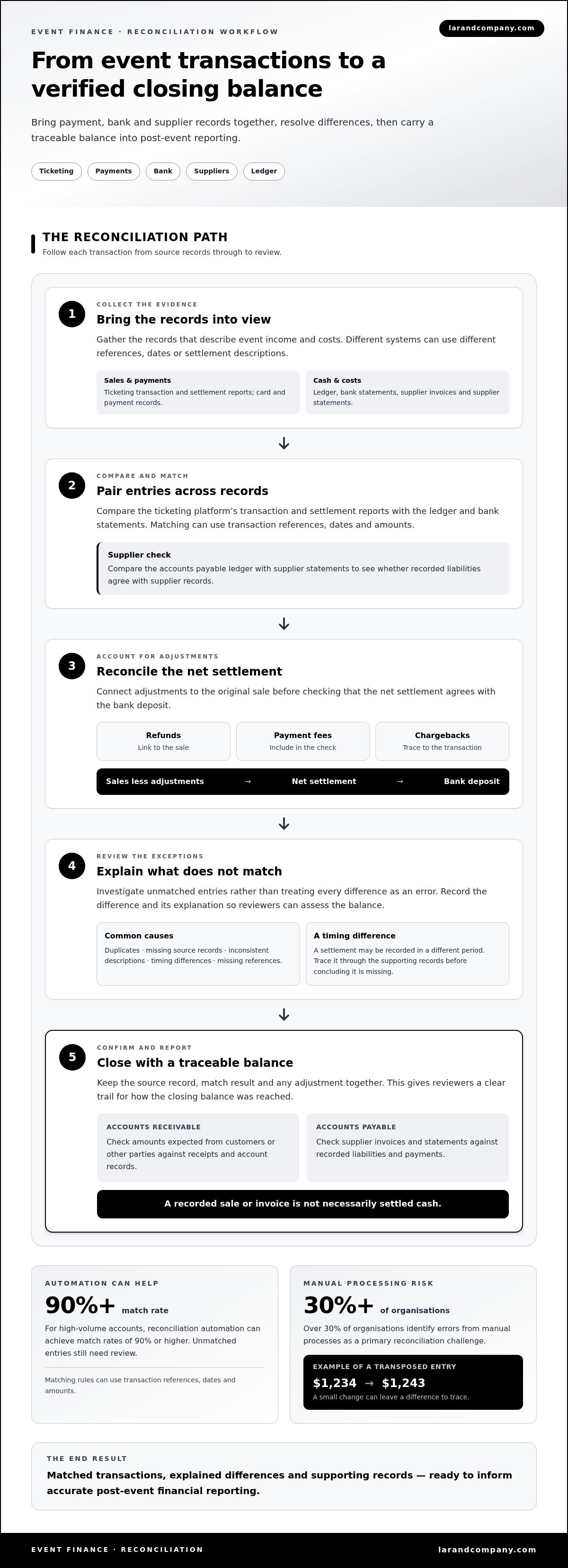
To reconcile ticket sales, refunds, fees and chargebacks, compare the ticketing platform’s transaction and settlement reports with the ledger and bank statements. Account for refunds, payment fees and chargebacks, then match the net settlement to the bank deposit. Investigate differences, such as a settlement recorded in a different period.
Accounts receivable reconciliation checks amounts expected from customers or other parties against receipts and account records. Accounts payable reconciliation checks supplier invoices and statements against recorded liabilities and payments. For an event, these checks distinguish outstanding income from unpaid supplier costs, rather than treating every recorded sale or invoice as settled cash.
Accounting software and reconciliation automation
Accounting software stores transactions in a ledger and can import bank or payment records for comparison. Reconciliation automation applies matching rules, such as transaction references, dates and amounts, to pair entries across records. For high-volume accounts, reconciliation automation can achieve match rates of 90% or higher.
A match is not the same as a complete review. Unmatched entries still need attention, including duplicates, timing differences and transactions with missing references. Keep the source record, match result and any adjustment together so a reviewer can trace how the closing balance was reached. This reduces repeated manual comparisons while preserving a clear review trail.
Challenges with transaction volumes and manual processing
An event can generate transactions across ticketing platforms, card processors, bank accounts and supplier systems. Each record may use a different reference, date format or settlement description. Staff must interpret these differences before deciding whether entries match. As transaction volumes grow, small inconsistencies become harder to distinguish from genuine discrepancies.
Manual work also creates room for avoidable errors. A transposed entry can turn $1,234 into $1,243, leaving a difference that must be traced through source records. Over 30% of organisations identify errors from manual processes as a primary reconciliation challenge. In a post-event accounting process, one incorrect amount can distort a balance and delay its review.
The pressure of high transaction volumes
Cash reconciliation can consume 30 or more hours a month for some finance teams. Many businesses have more than four full-time equivalents working on financial reconciliation, and 36% of companies lose at least one full workday per week to it. These figures show how repeated matching can absorb capacity otherwise used to review exceptions and prepare reports.
For an event, transaction volume is only part of the challenge. Refunds, credits, card fees and chargebacks may appear separately from the original sale. Reconciliation must connect each adjustment to its transaction, then distinguish timing differences from missing records. Without that sequence, teams may investigate the same entry repeatedly or carry an unresolved discrepancy into reporting.
Legacy providers and fragmented systems
Older payment systems may export transactions in formats that do not align with current accounting software. A ticketing report might identify a sale by booking reference, while a bank statement groups funds by settlement date. Staff then rely on spreadsheets or manual rules to bridge the gap. Across disconnected systems, manual reconciliation can take businesses days.
Fragmented records also complicate compliance and review. When a transaction moves through a processor, bank and ledger, each hand-off needs a traceable record. Missing references make it harder to show how a total was calculated. For example, a batch deposit may combine several sales and refunds, requiring supporting transaction details to explain its net value.
Common reconciliation challenges
Common obstacles include duplicates, absent source documents, inconsistent descriptions and timing differences. Hotels spend an average of two hours per day on financial reconciliation, illustrating how recurring account work can occupy substantial attention. For event teams, the equivalent pressure can arise during concentrated periods of ticket sales, settlements and supplier payments.
A practical approach is to separate matched items from exceptions, then record the reason and evidence for each unresolved difference. This keeps the next review focused and gives finance teams a clear view of whether an issue involves a delayed settlement, an incorrect credit or a transaction missing from the ledger.
Automation and reconciliation software
Reconciliation software compares financial records using rules that identify likely matches. For example, it can compare a payment processor’s settlement file with bank transactions using dates, references and amounts. This reduces repeated searches across spreadsheets, but the rules must reflect how each payment channel records activity.
Automation works best when source records arrive in a consistent format. A finance team might import ticketing settlements, bank activity and supplier documents, then map each file’s fields to the accounting ledger. If one system labels a transaction “booking reference” and another uses “payment ID”, the mapping determines whether the software can compare them reliably.
How automated matching works
A defined rule can pair entries when their references and values agree, or when a settlement total corresponds with several underlying transactions. For example, one bank deposit may represent a batch of ticket payments rather than a single sale. Reconciliation software can compare the batch with its supporting records, provided the relevant transaction details are available.
Rules can also flag likely duplicates, missing entries and unmatched amounts for review. A refund recorded in the ticketing system but absent from the processor file should remain visible as an exception. Keeping exceptions separate prevents an automated match from obscuring why two records differ.
Where human review remains essential
Automation cannot determine whether every difference is valid. A reviewer must assess the timing, source documents and reason for an adjustment. For instance, a payment recorded on one date and settled on another may reflect normal processing time, while a repeated charge could indicate a duplicate that needs investigation.
Clear exception categories help focus the review. Teams can classify unmatched items as timing differences, missing documents, incorrect references or suspected errors. The reviewer then records supporting evidence and any adjustment alongside the transaction, leaving a traceable explanation for the closing balance.
Building a controlled reconciliation process
Start by defining the account, period and source records. Import the ledger and corresponding external records, apply matching rules, then review every material exception before accepting the balance. For an event, separate records by payment channel when this makes settlement differences easier to trace.
Keep the original records, matching results and adjustment documents together. If a reviewer changes a transaction, the record should show what changed and why. A finance lead can then inspect unresolved exceptions and confirm whether they affect the report. This makes software part of a controlled accounting process, not a substitute for review.
Automation is most useful when it removes repetitive comparisons and leaves time for decisions that require context. A finance team can refine rules as it learns which payment references remain consistent across ticketing, processor and bank records. Reviewing unmatched items regularly can also reveal recurring data problems, such as inconsistent descriptions or incomplete source documents, that need to be addressed at their origin.
Post-event financial reconciliation
Compare the approved event budget with reconciled revenue and recorded expenses, using the same categories and event period. This shows where actual results differ from the plan, while transaction checks confirm whether the underlying figures are complete and accurate.
Start by gathering records for the event period: ticketing and settlement reports, bank activity, supplier invoices, receipts and card statements. Include petty cash records if cash was used. Define the accounts and dates in scope so transactions from another event or reporting period do not distort the balances.
Then review the records in a controlled sequence:
• Match revenue entries to settlements and bank deposits, noting refunds, fees and chargebacks separately.
• Compare supplier invoices and card receipts with expenses in the ledger, and identify missing or duplicate entries.
• Check debits, credits, opening balances and closing balances for each account under review.
• Record adjustments with their reason and supporting document, then review the updated balances.
Compare the budget after reviewing transactions. For each category, set the approved amount beside the reconciled actual expense or revenue. For example, trace a venue cost above budget to its invoice and record it in the correct category. A difference is useful only when its cause is clear, such as a revised scope, a timing difference or an incorrect ledger entry.
Separate unresolved discrepancies from verified figures. If a supplier invoice does not agree with the ledger, retain the invoice, identify the difference and document the action taken. If a petty cash balance lacks receipts, treat the missing support as an exception, not a confirmed expense. Investigating and correcting differences promptly keeps open items visible before reporting is finalised.
Once adjustments are entered, recalculate the closing balances and check that the event’s revenue and expense totals agree with their supporting records. An accounting manager or financial controller can then review and sign off the results. That approval records who assessed the reconciliation and whether any items remain for follow-up.
A completed post-event reconciliation gives decision-makers more than a final total. It links budget variances to accurate transaction records, highlights unresolved discrepancies and provides a clear basis for reporting. For financial reconciliation for events, the practical sequence is to reconcile first, compare actuals with the budget second, and explain each material difference before presenting the final results.
What is financial reconciliation for events?
Financial reconciliation for events means checking event-related financial records against supporting records, then explaining differences before reporting the results. It brings the event’s income, spending and account balances into a consistent view, so stakeholders can see how the final position was calculated.
Defining the event boundary matters. A production may involve ticket income, sponsorship receipts, venue costs, supplier invoices and card transactions, each recorded in a different system. Assigning records to the right event and accounting period helps prevent unrelated activity from entering the close. For example, a supplier invoice covering two productions needs to be allocated according to the work performed for each.
Reconciliation also distinguishes a financial record from a financial outcome. A ticket sale in a platform report shows that a transaction was recorded, while a bank settlement shows that funds were deposited. Comparing the records explains differences such as refunds, processing deductions or settlement timing. The same principle applies to expenses: an approved budget line is a plan, while a posted invoice or card receipt supports actual expenditure.
A useful event-level view links three layers:
Source activity
ticketing reports, supplier invoices, receipts and bank records show the underlying transactions.
Accounting entries
the ledger groups income and costs into the relevant accounts and event categories.
Reported position
reviewed balances and documented adjustments show the event’s financial result.
This structure supports more than a final profit or loss figure. A production manager can compare actual costs with approved categories and identify how scope, timing or purchasing decisions affected the result. Finance teams can distinguish settled income from receivables, and paid costs from outstanding supplier balances. Those distinctions make follow-up more precise.
Documentation gives each reported figure a traceable basis. If a venue charge is posted against the wrong event code, the invoice and allocation record show how to correct the entry. If an amount remains unresolved, the report can identify the discrepancy and its status instead of presenting it as a verified balance. This distinction protects the usefulness of the close.
The most valuable outcome is a financial picture that can inform the next production. Comparing reconciled results across events can reveal recurring cost categories, revenue timing issues or gaps in documentation. Teams can use these findings to refine future budgets, improve record capture and clarify reporting responsibilities. Comparisons are meaningful only when the underlying event records use consistent categories and definitions.
In practice, reconciliation connects transactions with decisions. It turns scattered records into an explainable event result, supported by evidence for income, costs and outstanding items. This gives organisers a sound basis for post-event reporting and planning the next production.
Lar&Co: Show Production
Lar&Co brings show, technical and site production into a coordinated delivery structure. For events with complex programmes, multiple suppliers or demanding production schedules, this work connects creative direction with the practical requirements of delivering the show. Organised project information and clear responsibilities can also support financial oversight, including the review of budgets, commitments and final costs.
Turn to Lar&Co when production demands call for coordinated planning across creative, technical and site teams. Lar&Co focuses on delivering the event, while financial reconciliation relies on the accounting records that document its transactions.
Contact Lar&Co to discuss your event.
Set the next production up with clarity
The value of financial reconciliation for events extends beyond closing the accounts. Its findings can inform how teams plan, allocate resources and structure financial oversight for the next production. Use the close as a reference point: identify decisions that need clearer ownership, records that need better coordination and budget assumptions that deserve another look.
Lar&Co’s Show Production, Technical Production and Site Management bring key delivery areas into focus. Where financial oversight and production planning intersect, clear responsibilities help teams align the event’s operational and financial picture.
For a considered conversation about your event’s production and financial requirements, contact Lar&Co about event reconciliation. The next production can begin with greater clarity.
Frequently Asked Questions
How often should you carry out reconciliation?
Set the frequency according to transaction activity, settlement timing and reporting needs. During a busy ticket-sales period, regular checks can reveal failed deposits or unexpected refunds before the event closes. Reconcile again after final settlements and supplier documents arrive, then align the completed review with the organisation’s accounting close. Set a defined period and consistent schedule rather than leaving activity unreviewed until reporting is due.
What is Account Reconciliation?
Account reconciliation reviews an account’s ledger balance against independent supporting records. For example, a cash account can be compared with the bank’s recorded activity, while a supplier balance can be checked against the supplier’s statement. The reviewer investigates differences and records explanations or corrections. This account-level view shows whether a particular balance is supported, rather than relying only on an event-wide total.
Why Is It Critical?
Reconciliation is critical because decisions based on incomplete balances can misstate an event’s financial position. If a refund remains unrecorded, reported revenue may appear higher than the amount retained. If an invoice is duplicated, costs may be overstated. A clear review also gives managers an evidence trail for approving reports, following up unpaid amounts and improving future planning. Its value lies in resolving what each balance represents before others rely on it.
What financial records should be reconciled after an event?
Gather records that show both the original activity and its settlement. These may include ticket sales and refund reports, bank and card statements, cash counts, petty cash receipts, supplier invoices, payment confirmations and the event ledger. Include the approved budget for variance analysis, but keep it separate from transaction evidence. Use event codes or consistent labels to distinguish one production’s documents from another’s, especially when suppliers work across several events.
How should event cash, card, and online payments be reconciled?
Reconcile each payment channel separately before combining verified totals. For cash, compare recorded takings with counted cash and deposit evidence. For card and online payments, compare transaction reports with processor settlements and bank deposits, accounting for refunds and deductions. Keep gross sales, adjustments and net receipts visible as separate figures. This makes it easier to locate a shortfall within one channel instead of obscuring it in a combined total.
How do event organisers reconcile vendor invoices, deposits, and final payments?
Compare each supplier invoice with the agreed scope, recorded liability and payment evidence. Apply any deposit to the final invoice, then confirm that the remaining amount agrees with the payment record. For example, if an invoice includes additional services, match those charges to approved changes or supporting documents before posting them. Record disputed amounts separately and retain related correspondence. This creates a clear trail from the initial commitment to the final supplier balance.
What is the step-by-step event financial reconciliation process?
Use a consistent sequence so each result has supporting evidence:
• Define the event, accounts and reporting period.
• Gather ledger entries and source records.
• Compare transactions and identify differences.
• Investigate exceptions and document corrections.
• Review closing balances and unresolved items.
• Approve the completed report and retain its support.
Assign responsibility for each stage so exceptions have a clear owner and follow-up does not stall.
What accounting software and tools are best for event reconciliation?
Choose tools that fit the event’s transaction sources and reporting workflow, rather than choosing software by name alone. Useful capabilities include importing ledger and settlement records, matching entries by reference, flagging exceptions and retaining supporting documents. For events delivered in the UK, USA, United Arab Emirates, Saudi Arabia or Qatar, assess whether the system can handle the currencies and reporting formats involved. A controlled spreadsheet may suit straightforward records, while more complex volumes can benefit from automation.